







TFVC Obsolete Policies: Why You Must Remove Them Now
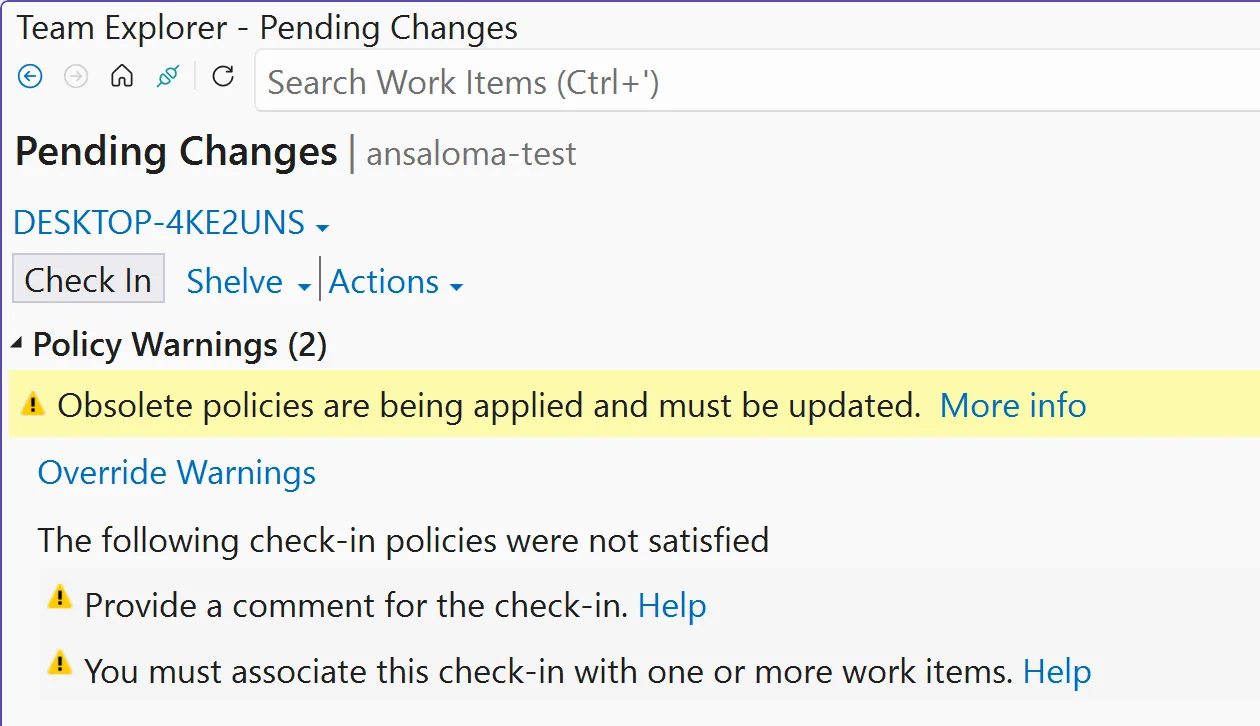
Obsolete TFVC Check-in Policies: The Elephant in the Room
Şöyle ki, You ever get that feeling something’s lurking under your feet, waiting for a good moment to trip you up? That’s legacy Team Foundation Version Control (TFVC) check-in policies right now in Azure DevOps. It’s like an old extension cord nobody remembers plugging in — until someone stumbles and coffee goes flying. If you’ve got dusty repositories or codebases older than half your team, yeah, this post is shouting at you.
Let me be direct for a second: Microsoft isn’t just thinking about ditching these legacy TFVC policies. They’re finishing the job. If you leave those old settings hanging around another week, boom—check-ins stop dead across your org. This isn’t some abstract “we’ll phase it out eventually” announcement; it’s more “finish your tea and fix it before work turns into an emergency call.”
The Transition Timeline: What Phase Are We In?
Bakın, I still remember spring 2024 at Logosoft—one of those dreaded all-hands emails from Microsoft dropped in our inbox (ciddiyim). Groans everywhere; touching TFVC is always a special kind of pain. Still, ignoring the warning isn’t even an option here unless you enjoy panic debugging.
Here’s how things are rolling out:
- Phase I: Policies were tagged obsolete but didn’t block anything yet. Out-of-sight, out-of-mind if you blinked.
- Phase II (now): Every check-in with legacy baggage gives off warning bells; Visual Studio Team Explorer tries to nudge you toward fixing them—but only if you move fast enough.
- Final Phase (about to hit): Any repo stuck with even one outdated policy gets totally blocked—no commits allowed, no quick fixes through Team Explorer anymore. You’ll be forced into C# territory whether you like it or not.
If you’ve ever snoozed on notifications about old config stuff—this time it’s non-negotiable.
The Reality Check: Legacy Systems Aren’t Going Anywhere Soon
This saga? Classic proof that “just keep what works” rarely ends well for IT teams tied down by ancient platforms! Half my career has been wrangling tools that should have retired years ago—I’ve told clients dozens of times “if nothing’s broken don’t change anything”—until weeks like these prove otherwise.
Patching up deprecated TFVC features isn’t plug-and-play either (I wish). Early this year we had compliance headaches with an international bank using Azure DevOps Server 2020—they’d kept over ten custom check-in policies from some developer who left ages ago! Took hours poking through comments and logs just to figure out which ones mattered and which could vanish without breaking production builds.
The Main Pain Points
- You won’t see which policy broke things after final deprecation—you’ll just get a generic block every check-in attempt.
- If nobody remembers why certain rules exist… congratulations on becoming Indiana Jones for hidden config artifacts!
- Your build pipelines relying on classic gates will tank unless cleaned up first—which means real risk to releases.
💡 Note: Yanking obsolete TFVC policies is more than “tidy-up” — it’ll save headaches and wasted hours when everything locks down next update cycle.
Triage Time: How To Find And Remove Those Pesky Policies
İnanın, No point pretending — sometimes removal takes five minutes; other times it’s a scavenger hunt through settings files messier than grandma’s attic closet. Here’s what typically works best:
The Quick Win (Team Explorer Method)
- Bust open Visual Studio (latest preferred, but most versions do).
- Dive into Team Explorer; connect straight to your target project/repo.
- Sneak over to Settings > Source Control > Check-in Policy tab.
- Nuke any listed obsolete policy entries (watch for greyed-out or flagged items).
- Add replacements if needed—and make sure someone hits Save this time!
I ran through this routine last month helping our finance devs modernize their repo standards—not bad at all, barely five minutes per repo once we found where ghosts were hiding (.tfignore wasn’t the only thing haunting us). Easy win… except when Team Explorer refuses deletion because of corrupted data or mismatched APIs—that scenario? Not nearly as fun…
The Last Resort (C# Console App Fix)
If you’re already locked out—or staring at projects so vintage they belong in an IT museum—you’ll need proper C# muscle: Kanban and Sprint Boards: Surviving the Screen Space Crunch yazımızda da bu konuya değinmiştik. Azure DevOps Server Patching in 2024: Why You Shouldn’t Ignore It yazımızda da bu konuya değinmiştik.
// Sample C# snippet
var collectionUri = "https://yourorg.visualstudio.com/";
var currentProjectName = "yourProject";
using (TfsTeamProjectCollection tpc = new TfsTeamProjectCollection(new Uri(collectionUri)))
{
var versionControlServer = tpc.GetService<VersionControlServer>();
TeamProject teamProject = versionControlServer.GetTeamProject(currentProjectName);
teamProject.SetCheckinPolicies(null);
}
If writing console apps makes your eye twitch—it did mine too—but honestly this script comes straight from Microsoft docs! Swap placeholders with real values from your environment and log in as Project Admin when prompted.
Did something similar last autumn for a client lagging behind on Azure DevOps Server Patch 1—their repos were back online within twenty minutes after removing ancient policies buried since Windows Server days.
But heads-up here… Don’t skip NuGet package ‘Microsoft.TeamFoundationServer.ExtendedClient’ install beforehand—and please back up configs before mass-editing core settings! (evet, doğru duydunuz)
Caveats And Watch Outs — It’s Not All Roses Yet
- Potholes worth knowing before pushing big changes:
- No Undo Button:
Zap legacy rules via C#, they’re vaporized permanently—no Recycle Bin tricks possible. - User Education Needed:
Once done updating/removing policies? Some devs lose favorite blockers/warnings (“Why doesn’t my work item link validation show errors anymore?”). Prep everyone ahead instead of letting confusion multiply. - Mismatched Environments Can Act Weirdly:
Hybrid setups mixing cloud repos/local servers sometimes behave unpredictably—a buddy from Istanbul fintech pinged me last week after his build agents threw mystery errors post-removal.
Don’t wait until business stalls mid-sprint — review source control settings while there’s still breathing room!
A Few Practical Tips Before Wrapping Up…
- Toss these ideas into Monday’s standup agenda:
- ▢ If unclear about active customizations/policies…, document everything showing before diving into edits.
▢ Create test branches/projects first! — nobody likes live fire drills so try removals somewhere safe.
▢ Tie clean-up events to bigger upgrade cycles (patch alongside next Azure DevOps release rather than solo ops).
If you’re curious about wider Azure DevOps landmines impacting teams globally—including outages caused by sneaky config files—I recommend reading my deep-dive:
Build Identities in Azure DevOps: The Temporary Rollback Nobody Saw Coming. Sometimes actual stories help more than dry documentation…
The Bottom Line — Don’t Let Obsolescence Derail Your Pipeline!
I’m not saying drop everything instantly—but let those obsolete TFVC check-in policies linger another week and you’ll regret skipping triage sooner.
Do yourself a favor—block thirty minutes tomorrow morning, grab extra Turkish coffee if needed—and audit every repo still running old-school rules.
Next month you’ll thank yourself when some unlucky teammate asks “Can anyone push changes?” …and silence follows because nobody prepped.
And hey — worst case scenario? Shoot me a message—I’ve untangled gnarlier migrations since early .NET days 😏
Source: TFVC Remove Existing Obsolete Policies ASAP.
Share this:
Related Posts
Authentication Tokens: Why You Should Never Trust the Payload22 Mar 2026Team Calendar Extension for Azure DevOps: What’s Actually New?23 Mar 2026GitHub Copilot Custom Agents in Azure Boards: My Take on the Real Impact24 Mar 2026Azure CLI’s New AI Agent Logs: Real Debugging Without the Portal Headache25 Mar 2026






Post Comment