







Remote MCP Server in Microsoft Foundry: What You Need to Know
Why the Remote MCP Server Preview Actually Deserves Attention
Doğrusu, You know those nights when you’re staring at your screen, cursing a busted build pipeline or hunting down automation bugs in Azure? Yeah, I’ve been there more times than I’d like to admit. When Microsoft dropped the “Remote MCP Server preview” for Azure DevOps inside Foundry, my first reaction was basically a shrug. Sounded like another incremental update—maybe handy, maybe not. But then I dug deeper. And honestly? There’s a bit more going on than the marketing blur lets on.
I flashed back to this February in Istanbul—sitting across from a client whose workflow looked like spaghetti code meets Frankenstein’s toolkit: half custom scripts, half SaaS mishmash, all glued together with hope and frustration. If we’d had an easier way to plug intelligent agents into their real DevOps tasks… wow. We could have avoided so much hassle (and probably skipped that midnight kebab run). So yeah, this new feature piqued my curiosity.
Let me cut through the fluff: here’s what it does and doesn’t do, how it shakes out in practice—and whether it actually matters for folks who live and breathe CI/CD chaos.
Wait—What Is Microsoft Foundry Again?
I’ll be honest: until about twelve months ago, “Foundry” meant nothing to me except vague conference buzzwords. Turns out it’s Microsoft’s stab at wrangling AI workflows under one roof—models, deployment steps, orchestration controls; the whole buffet is right there if you want to sample everything at once.
Think of it as an over-caffeinated Swiss Army knife designed for building copilots or automating business logic without breaking things every other release cycle.
We started using Foundry here at Logosoft mainly for clients experimenting with LLM-powered bots—but also demanding ironclad governance and security (banking types especially get twitchy if things aren’t locked down tight). Heads-up: The learning curve is no joke! You’ll spot familiar pieces if you’ve played around with Azure ML or Cognitive Services before—but expect some totally fresh concepts around agent orchestration and resource scoping.
💡 Note: Never touched Foundry? If you’re comfortable tinkering in Azure ML Studio or poking around Cognitive Services APIs, you’ll recognize parts of it—but don’t assume it’ll feel identical.
MCP Server Preview—More Than Just Another Box to Check
The remote Managed Control Plane (MCP) Server acts as the middleman between your smart agent running inside Foundry and your actual Azure DevOps environment—not exactly rocket science but definitely smoother than what we dealt with pre-2024.
Previously? Wiring up AI-driven flows meant scripting against random endpoints or hacking together brittle API calls by hand—a recipe for stress-induced snacking.
The new Remote MCP Server preview makes connecting agents to real-life Azure DevOps pipelines far less painful—which honestly feels almost suspiciously easy after years of clunky workarounds.
Eren (one of our sharpest DevSecOps minds) put this thing through its paces last week on his own side project. His verdict was refreshingly blunt: “Not flawless yet… but massively less tedious compared to our old approach.” He fired off builds and pulled status updates straight from chat prompts—with zero glue code needed.
Quick Setup Walkthrough (Real Talk)
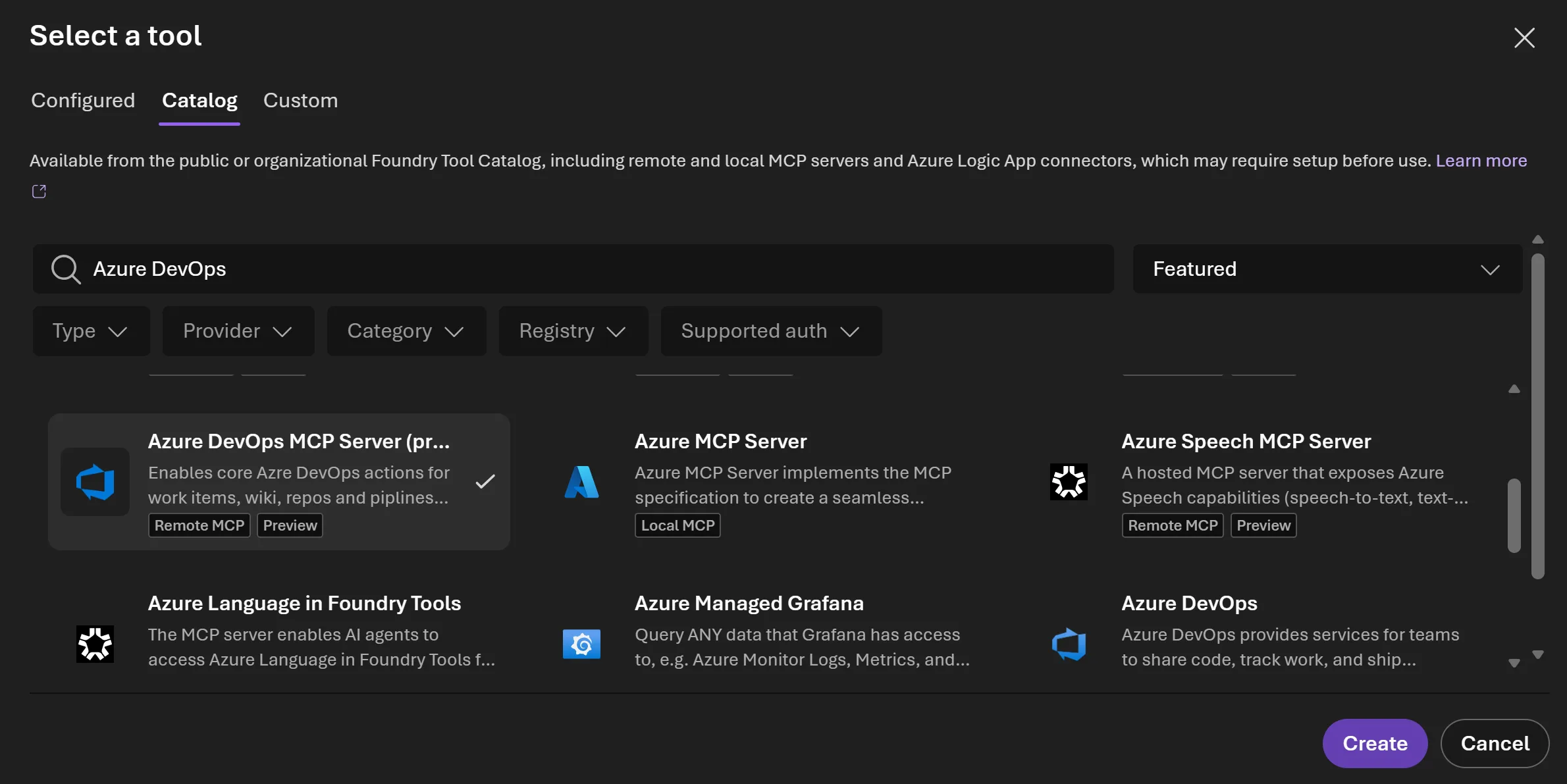
- Add via Catalog: Open up Foundry portal; click ‘Add Tools’ and search “Azure DevOps”. You should spot “Azure DevOps MCP Server (preview)” sitting pretty near the top.
- Create & Connect: Select it, hit ‘Create’, enter your org name—that’s literally all they ask—and click ‘Connect’. After slogging through service principal setups dozens of times before? This feels borderline magical…or like you missed a step somewhere.
- Tweak Permissions: Now comes something genuinely useful—you can fine-tune which tools/features your agent can touch. Security folks will nod approvingly; no more wild-west permission sets sneaking into prod by accident!
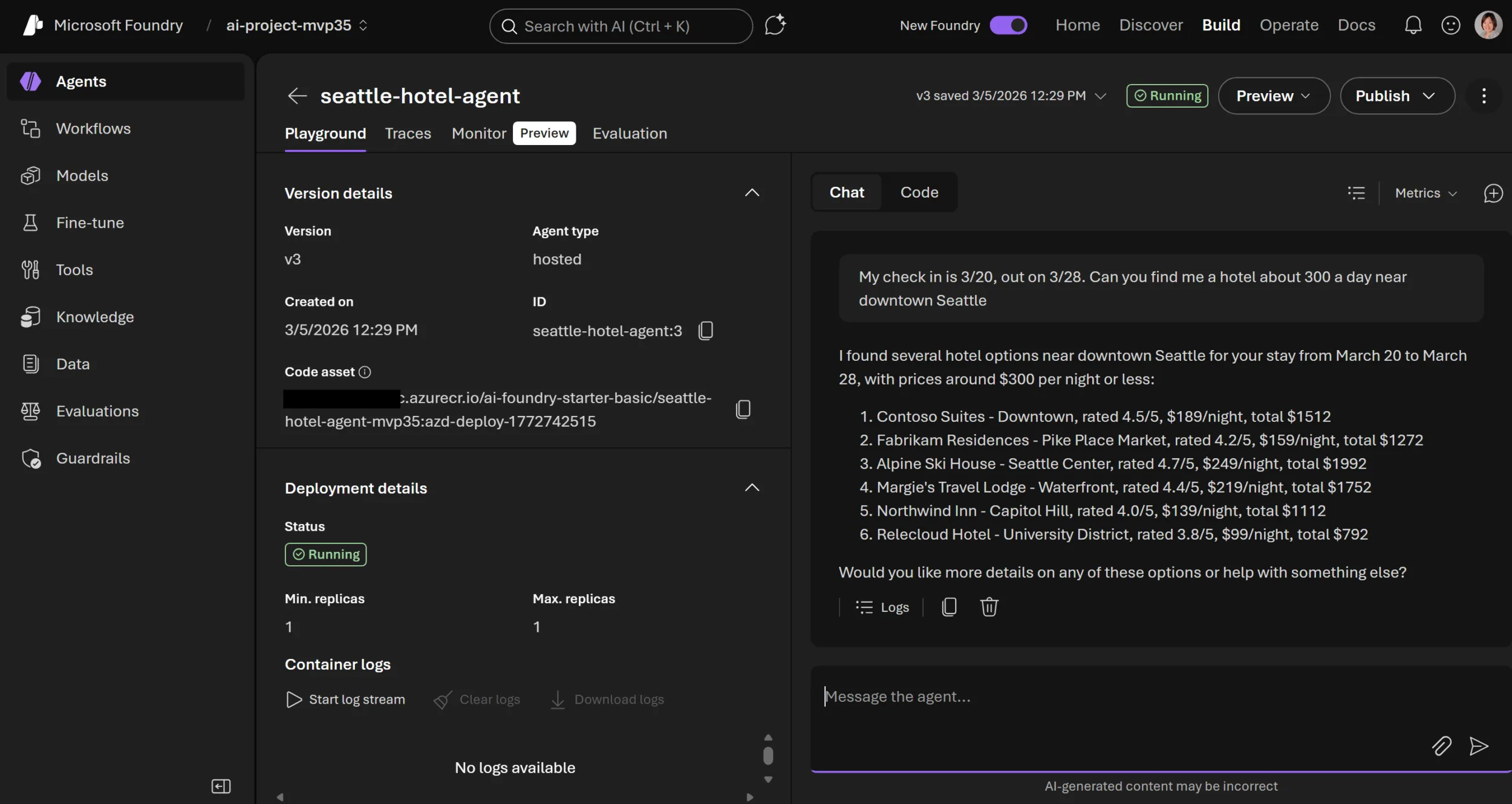
- Poke It Live: Crack open a chat window with your agent inside Foundry; toss commands like “Trigger pipeline Y” or “Show PRs pending review”. Results range from slick automation moments to delightfully unpredictable quirks depending on prompt complexity.
The Good Bits… And Where It Still Feels Rough
- Simplicity wins: For everyday use cases—like firing builds via chatbot or getting quick summaries—the whole flow is surprisingly straightforward and quick-to-launch.
- Crispy security control: Being able to restrict tool scope means fewer nightmares about rogue agents deploying Friday-night code without anyone noticing.
- Bumpy edges remain: As of April 2024? Error handling isn’t elegant yet; responses can lag during heavy workloads—we saw timeouts first-hand trying to deploy for retail clients in Ankara under pressure.
Bir bakıma,
This Changes Day-to-Day Life… Sometimes
If you’re deep into YAML pipelines already—or juggling GitHub Actions—but craving more conversational interfaces layered over traditional flows? This gives you room to experiment without ditching everything built so far.
During Logosoft’s recent internal hackathon I ran a quick trial:
Set up an agent listening for user requests (“Deploy version X,” “Who broke the build?”) piped directly via MCP into real Azure pipelines.
Outcomes? Authentication Tokens: Why You Should Never Trust the Payload yazımızda da bu konuya değinmiştik. Azure DevOps Remote MCP Server Preview: Real-World Impressions and Tips yazımızda da bu konuya değinmiştik.
- A trio loved it: Routine checks zipped by quicker; approvals didn’t bog down progress anymore.
- Skeptic emerged: One group wanted tighter logging granularity—they weren’t wrong!
- Total failure brigade: Another team managed to break things entirely (bonus points!), filed multiple bug reports which actually got noticed by Microsoft support.
💡 Note: Don’t expect this tech to replace engineers—or even dashboards—in the next year or two! But it’s already helping teams collaborate better especially between devs tired of clicking through endless UI tabs and PMs who’d rather type natural language questions.
Bumps In The Road—Read Before Diving In!
No preview ever lands perfectly clean—and this one’s no exception.
Here’s what drove me nuts so far:
- Error Messages Are Vague: “Something went wrong” dominates instead of detailed feedback—troubleshooting is guesswork half the time unless you dig deep yourself.
- Lacks Power User Customization Out-of-the-box: Standard actions work great until you want conditional triggers based on obscure fields…then frustration creeps in fast.
- No On-Prem Support Yet? You’re stuck using cloud-hosted DevOps orgs—for now anyway—as TFS/Azure DevOps Server behind firewalls gets left out completely as far as I’ve seen!
Here’s my take:
If you’ve already got GenAI copilots buzzing around your workspace,
the Remote MCP plug-in delivers genuine productivity gains—
just brace yourself for rough spots while they’re still polishing things up!
The Wrap-Up…and What Comes Next?
If you’d told me two years back we’d soon orchestrate entire CI/CD flows just by chatting with enterprise-grade AI agents built atop Microsoft platforms—I would’ve called bluff.
But suddenly that sci-fi vision looks weirdly close:
My best advice?
- Create a dummy test agent hooked up via Remote MCP;
start small;
probe which prompts succeed smoothly versus which ones break spectacularly—
get both developers and PMS playing early so habits adapt naturally rather than fighting change later on!
This stuff won’t fit everyone immediately—not even close! But ignore these trends too long,
and competitors will leapfrog while legacy shops play catch-up till midnight rolls around again…
Source: “Remote MCP Server preview in Microsoft Foundry”
Craving more hands-on stories from modern Azure trenches?
Dive into my full walkthrough here:
Azure DevOps CI/CD Pipeline Setup Guide.
Share this:
Related Posts
Azure Developer CLI’s New AI Agent Commands: Local Testing Finally Doesn’t Suck25 Mar 2026Azure Developer CLI in 2026: JMESPath Queries, Slot Deployments & Real Surprises26 Mar 2026Team Calendar Extension for Azure DevOps: What’s Actually New?23 Mar 2026Azure DevOps Remote MCP Server Preview: Real-World Impressions and Tips22 Mar 2026





Post Comment