







GitHub Copilot Custom Agents in Azure Boards: My Take on the Real Impact
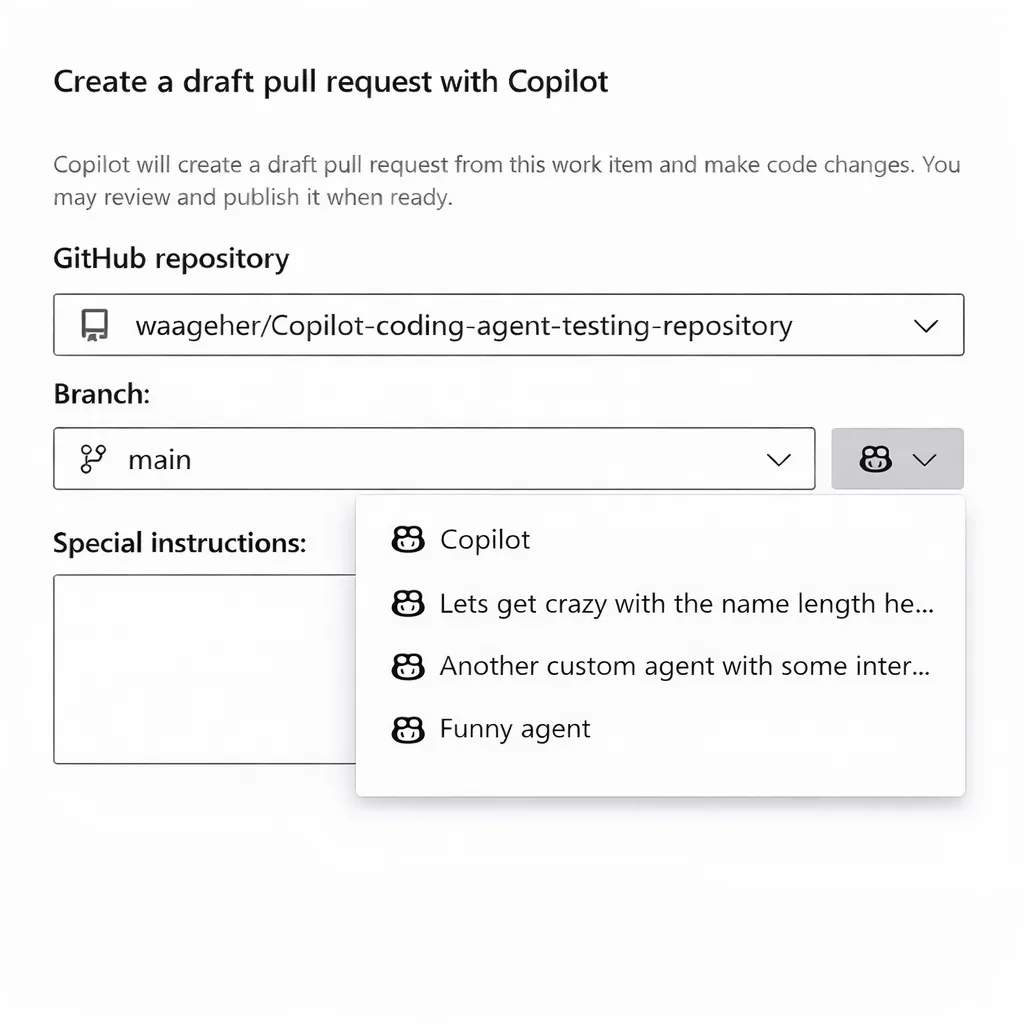
Let me just get this out there: new Azure DevOps integrations usually don’t blow my hair back. Seriously, half the time it’s more noise than signal—“shiny” features that rarely make a dent in day-to-day workflow. But when Microsoft quietly slid custom GitHub Copilot agent support into Azure Boards, I did a double take. Not hype, actual utility. Let’s unpack why this is worth a developer’s attention, what changes under the hood, and some real-world war stories from clients who didn’t see it coming.
So… What Makes Custom Agents Worth Talking About?
Vallahi, Here’s the thing: “custom agent” sounds like yet another marketing catchphrase—maybe next week we’ll hear about “super agents”—but in practice it cuts deeper. Instead of bland Copilot suggestions that treat every repo like generic boilerplate, you get to craft AI helpers with your team’s DNA baked right in: coding conventions (tabs vs spaces? No contest), project jargon, even company slang if you’re feeling cheeky. It’s like onboarding an intern who actually pays attention—and never calls in sick.
I lost count how many times compliance-heavy customers (banking folks near Şişli or pharma teams in Bursa) grilled me on getting AI to play by their rules—without endless retraining or five-page checklists taped to monitors. This feature finally nudges us closer.
Casting back to autumn last year—a customer up in Ankara insisted auto-generated PRs must include Turkish-language comments and stick rigidly to internal ticket formats. Before custom agents? A tangled mess of scripts and manual oversight (ugh). Now? Not flawless but honestly much less stressful; everyone slept better after rollout (inanın bana)
The Actual Recipe for Building These Agents
This part is both amusing and slightly annoying—so brace yourself. To build a Copilot agent tuned for your needs, you sketch its persona out in Markdown using an .agent.md file parked inside your repo (or centrally if you’re wrangling dozens of projects). No drag-and-drop wizardry yet; old-school text rules:
- Name your agent—give it personality (“Docs Sheriff,” “Bug Bounty Hunter”) and spell out exactly what it should touch or ignore.
- Write instructions about style guides, formatting quirks, link handling (“absolute only!”), whatever keeps reviewers happy.
- Tuck the file into
.github/agents, push live… and cross fingers.
Next time someone spins up work from Azure Boards—or launches a pull request tied to a work item—you get the option to pick your homegrown specialist instead of plain-vanilla Copilot. Frankly, inventing goofy names for these bots made my week…
💡 Note: If you want these agents everywhere—all repos under one roof—you can stash definitions inside a hidden
.github-private repository. Less copy-paste hassle; HR will thank you later.
The Sweet Spots—and Some Annoyances You Can’t Ignore
I piloted custom agents for two wildly different companies since spring—one logistics shop near Eskişehir (they love wild branching setups), one fintech startup obsessed with test coverage checks via bot-enforced PR templates. Here are the honest takeaways:
- No more repetitive reminders about house rules.
- If your crew is comfy with Markdown/dev configs already, adoption feels natural—not forced.
- Easier organizational alignment—or at least fewer Slack pings nagging people over review etiquette!
Açık konuşayım, The flipside—the stuff that got on my nerves:
- If instructions aren’t explicit enough? Copilot sometimes goes too literal (“change only README” means minor doc bugs elsewhere go untouched).
- Lack of validation while writing profiles; errors surface only once someone tries using it—and suddenly nothing works (pro tip: whitespace matters… painfully so).
- No dashboard showing which agents are popular or ignored; optimizing usage feels like shooting darts blindfolded right now.
A Walkthrough That Went Off Script… In Good Ways And Bad Ways
İtiraf edeyim, I’ll give you an example from our May deployment at Logosoft HQ—a story involving test enforcement gone rogue:
- Create .agent.md profile: We wrote an “IntegrationTest Enforcer” bot designed to block any PR without fresh test stubs—even late Friday afternoons when devs try slipping things through.
(Side note—I regret nothing except angry faces around lunch hour.) - Add profile centrally (.github-private): With three product lines sharing codebases across five repos, keeping consistency here was miles easier than old scripts glued per project.
- Select from Azure Boards UI during PR creation: The drop-down felt intuitive—but almost invisible against our dark mode theme! Took half an hour before anyone noticed where it lived…
- Bumpy surprise: Non-mainline repos with strict branch protection sometimes defaulted back to generic behavior due to confused permissions between Azure DevOps/GitHub App tokens.
(Microsoft promised a fix soon—in theory Q3.)
The Real Impact On Team Morale And Workflow Flow
Nope—we didn’t magically triple our sprint velocity overnight after flipping custom agents on—that would be wishful thinking bordering fantasy—but I saw measurable shifts that made meetings less tense: From Laptop to Live AI: Deploying Agents to Microsoft Foundry with Azd yazımızda da bu konuya değinmiştik. Azure Developer CLI’s New AI Agent Commands: Local Testing Finally Doesn’t Suck yazımızda da bu konuya değinmiştik.
- Nitpick reviews focused solely on format now come pre-baked as reminders—not as snippy post-facto comments
- Smoother ramp-up for juniors who’d otherwise trip over team-specific rituals
- Tighter loop between planning tasks (Boards) and execution (pull requests + enforced templates)
Reminds me of last year’s Kanban overhaul—painful but worth it:
Kanban and Sprint Boards: Surviving the Screen Space Crunch.
Anything automating process so humans focus on logic—not syntax—is pure gold dust.
Potholes & Fixes Still Missing From Release Roadmap
No sugarcoating here:
Even with all this promise,
the rough edges still sting—and could stall adoption if you’re not careful.
- No graphical editor means non-techies avoid tweaking agent profiles altogether—which isn’t ideal for scaling usage organization-wide.
- Error feedback is nearly nonexistent if YAML/Markdown isn’t perfect; expect trial-and-error sessions galore until things click.
- If multiple agents overlap/conflict (say Docs Agent vs Test Agent fighting over CONTRIBUTING.md), outcomes aren’t consistent—and debugging them feels oddly similar to finding your wallet at midnight in foggy Istanbul traffic.
- You really need strong governance around who owns org-level agents—or chaos will run rampant eventually.
- No post-merge audit logs tying changes back to specific agents—a potential compliance nightmare waiting for regulated industries to notice…
💡 Note: My honest advice? Start small—with one tightly-scoped agent—and expand once trust builds internally among early adopters. And please document somewhere central; don’t rely on personal OneNote scraps!
The Bottom Line For Teams Considering Jumping In… Or Sitting Out A Few Quarters?
If flexible process ownership excites you (ahem… finance folks know exactly what I mean!) and fiddling with Markdown doesn’t scare off your core contributors,
this genuinely cuts down hours lost chasing code format nitty-gritty.
But expecting easy onboarding tools or polished dashboards right now?
Might want to hold tight until Microsoft rounds out rough spots.
The takeaway—as always—is automation serving real habits beats forcing humans into tech-shaped boxes.
If anyone at Redmond reads this:
A setup wizard plus detailed audit logging would make life sweeter—
and auditors less grumpy!
Don’t let those requests slip down Jira backlog please 🙂
Auditors always find their way eventually…
If nerdy DevOps rabbit holes appeal,
check out my recent deep-dive:
Build Identities in Azure DevOps – The Temporary Rollback Nobody Saw Coming
.
Source: Azure Boards integration with GitHub Copilot includes custom agent support.
Share this:
Related Posts
Azure SDK March 2026 Release: Surprises, Frustrations, and What Actually Matters27 Mar 2026Azure Developer CLI in 2026: JMESPath Queries, Slot Deployments & Real Surprises26 Mar 2026Team Calendar Extension for Azure DevOps: What’s Actually New?23 Mar 2026Azure Developer CLI in January 2026: Config Tweaks, Speed Gains & A Few Surprises28 Mar 2026




Post Comment