







Build Identities in Azure DevOps: The Temporary Rollback Nobody Saw Coming
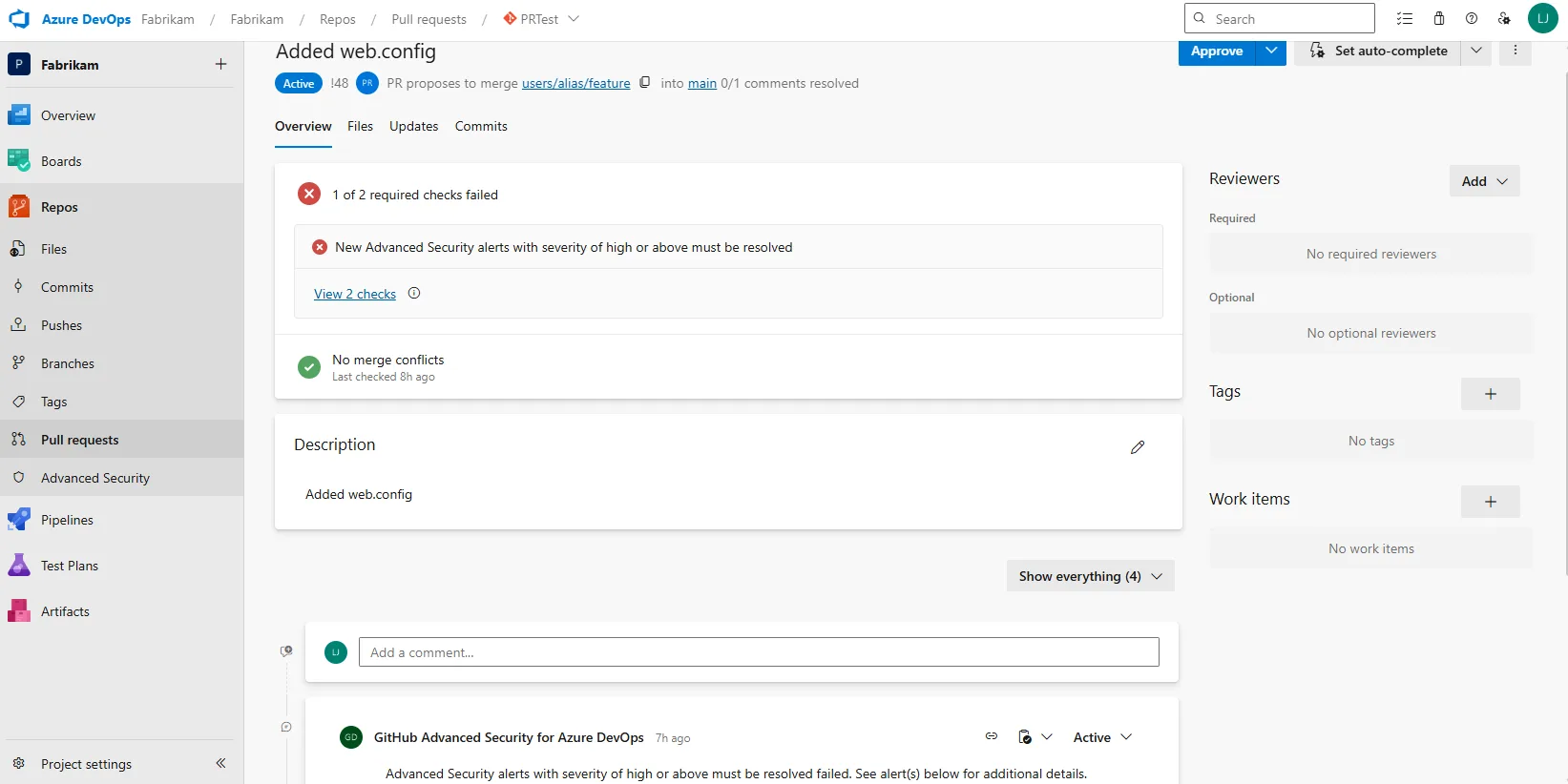
Did you catch the news? Azure DevOps tossed a curveball at us lately. Out of nowhere, build identities and Advanced Security started acting up — then Microsoft reversed course just as quickly. Blink, and you’d miss it. I didn’t, but my pipelines sure did; all those “permission denied” errors flooding in overnight? Not exactly what I wanted to wake up to. So what’s the real story here? Why are folks (like me) suddenly scrambling? And most importantly: what do we need to fix before this whole mess comes roaring back in April 2026?
Hold Up — What Changed With Build Service Permissions?
Let’s roll things back for a second. Somewhere around Sprint 269, Microsoft decided it was time to tighten ship security-wise. They locked down those default “Project Collection Build Service” accounts, cutting off their ability to read Advanced Security alerts via API calls. The reasoning was pretty sound: attackers love predictable service identities — they’re everywhere, easy targets.
Except… lots of teams (mine included) were actually using those identities deliberately for automation jobs that monitor security alerts as part of release gates (ki bu çoğu kişinin gözünden kaçıyor). At Logosoft earlier this year — January if memory serves me right — we migrated a logistics client in Ankara whose entire CI/CD flow hinged on pipeline builds checking critical vulnerabilities mid-deployment. Suddenly, every job hit “forbidden” at the Advanced Security endpoint without warning or time to prep new connections.
I figured maybe it was just our unlucky day — nope! Turns out the same thing happened everywhere else too: support tickets went wild and customers howled loud enough for Microsoft to push the pause button and temporarily restore access for build service accounts while everyone regroups. But let’s not kid ourselves here: this is temporary. Come April 15th, 2026…these restrictions are coming back and staying put.
Heads up! This rollback is only buying time—by April ‘26 you have to switch away from build service identities for Advanced Security API reads or risk your automations breaking down again.
You Can’t Escape Service Principals Anymore
Açıkçası, This brings us straight to that uncomfortable question nobody wants to ask yet everyone needs an answer for: now what? You could stick your head in the sand until deadline day arrives—but let’s be honest with ourselves—that’s asking for even bigger headaches later.
The fix? Azure service principals (“SPs”). Instead of using default pipeline identities, set up dedicated SPs with tightly-scoped permissions (“Advanced Security – Read alerts”) per repo you care about.
- Why SPs anyway? Unlike pipeline agents’ inherited context, SPs are explicit objects; auditing who did what becomes far easier when everything traces back cleanly.
- No surprise license bills: Unless your SP commits code itself (unlikely), you aren’t burning any costly committer slots under Advanced Security—something I totally miscalculated last year during cost reviews at Logosoft!
- Narrow scope = happier auditors: Keep permissions granular—repo-level beats org-wide whenever possible (been there, learned that). No one loves sprawling privileges except hackers.
İnanın, I set this up recently for a fintech firm over in Istanbul (late autumn last year). We moved all vulnerability triage scripts off build identity context onto individual SPs; with approvals/key vault wiring included, migration took maybe half a day tops—but compliance instantly got way less nervous once audit logs proved exactly which automation triggered each alert poll.
💡 Note: Don’t procrastinate until deadline week! Old secrets pop up when migrating pipeline connections; guaranteed you’ll find permissions leftover from two managers ago.
The Awkward Side Effects Nobody Warned Me About
Yani, If I claimed switching everything over is smooth sailing—I’d be stretching reality quite a bit! Managing more service principals means more work rotating keys and keeping track of credentials (especially in old classic pipelines where YAML updates lag behind UI features). Some extensions flat-out don’t support SP authentication yet either; I saw one team forced into rewriting PowerShell scripts simply because inherited pipeline identity stopped working after years of happy ignorance… painful stuff!
And here’s something else people forget—centralizing everything on a single mega-SP can become risky if anyone compromises its credentials later on. Sometimes splitting into multiple narrowly-scoped SPs really does reduce blast radius if someone fumbles key management down the road.
Status Checks Are Coming Soon… Well, Sort Of
If building custom polling logic sounds like too much trouble—honestly fair enough—there’s good news ahead too! Native status checks should land soon (Sprint 272ish), letting teams block pull requests automatically based on detected high/critical vulnerabilities instead of scripting custom API calls via pipelines every time.
The upside? Reviewers get instant feedback during PR merges; unsafe code flagged by Advanced Security blocks merges right where devs make decisions—not hidden deep inside automation jobs only ops folks see later. Team Calendar Extension for Azure DevOps: What’s Actually New? yazımızda da bu konuya değinmiştik. TFVC Obsolete Policies: Why You Must Remove Them Now yazımızda da bu konuya değinmiştik.
- No extra scripts required—just set branch protection rules per repo/branch
- No additional licenses necessary unless checks modify repository state directly
- A word of caution though—not all scenarios are covered yet; some orchestrations still require raw API access (multi-repo enforcement/reporting dashboards won’t magically solve themselves)
An Example That Changed My Mind About Status Checks Completely
I used to think native status checks wouldn’t cut it—a holdover from years spent writing cronjobs against TFS servers circa early-2010s—but after trialing them last month on our own “AskınKilic.com.tr” test repos…my perspective changed fast! Setup barely took ten minutes per branch rule and developers immediately spotted blocked merges whenever static analysis flagged nasty CVEs hiding inside dependencies pulled from upstream sources.
Fewer post-deploy fire drills—and no late-night hotfix marathons patching code merged against warnings nobody noticed at review time!
Migrating To Service Principals — A Checklist Worth Sharing
Bence, If you’re still running legacy patterns with build identities reading security data direct from APIs…here’s my rapid-fire checklist from helping five different clients update workflows this spring:
- Create separate Azure AD app registrations by environment/pipeline type (dev/test/prod split pays dividends long-term!)
- Add each SP as contributor only where needed—instead of granting broad project/org perms by default;
- Silo credentials properly via Key Vault or similar—no more secrets buried inside yaml files please 🙏;
- Migrate endpoints gradually; run dry-run builds first so production isn’t caught off guard by missing permissions;
- Add calendar reminders six months before cutoff dates so nobody scrambles last minute after someone retires 😂;
Never underestimate how many outages happen due not just to bugs—but expiring secrets or forgotten role assignments!
The Bottom Line (& Hard Lessons Learned)
You know what’s strange? For ages these pipeline identity models ran untouched…and suddenly incident reviews everywhere reveal hidden dependency chaos—from Turkish banks upgrading stacks earlier this winter through SaaS launches sprinting regulatory audits across Istanbul just weeks ago.
- This rollback gives us breathing space…but don’t expect permanent reprieve;
- Migrating early equals fewer headaches later on;
- Status checks provide fresh safety rails—even if coverage isn’t universal yet;
- Lousy internal communication derails adoption worse than technical hurdles do—always document every change or future-you will curse present-you someday!
If you’ve ever wrestled authentication quirks (Authentication Tokens & Why You Should Never Trust The Payload) you know these policy shifts aren’t hypothetical—they burn real hours when ignored!
💡 Note: If you’ve got war stories—or hit snags migrating off build service accounts—drop me a line below! Let’s pool knowledge before anyone gets blindsided again come spring ‘26.
This is your moment—the window before April ’26 closes—for shoring up DevOps automations so next time history repeats itself…it doesn’t catch us napping!
Share this:
Related Posts
Auto-Install azd Extensions in Dev Containers: My Hands-On Take28 Mar 2026GitHub Copilot Custom Agents in Azure Boards: My Take on the Real Impact24 Mar 2026JMESPath in Azure Developer CLI: Filtering JSON Output Without Tears27 Mar 2026Azure Developer CLI in January 2026: Config Tweaks, Speed Gains & A Few Surprises28 Mar 2026




Post Comment